
Transaction-Level Reconciliation
Transaction-level reconciliation compares NACH/payment file records against webhook payment data to identify payments that need to be posted to Fineract.
How It Works
For lenders that have both NACH files (uploaded via S3) and webhook payments (Razorpay/Cashfree), the system reconciles both sources:
Reconciliation Sources
| Recon Source | Lender | NACH File | Webhook |
|---|---|---|---|
gb_nach | GB | Cashfree NACH | Cashfree webhook |
ugro_nach | UGRO | Cashfree NACH | Cashfree webhook |
ugro_razorpay_nach | UGRO | Razorpay settlement | Razorpay webhook |
vivriti_nach | Vivriti | Razorpay settlement | Razorpay webhook |
Match Key
Records are matched using md5(loan_external_id + date + amount). If a NACH record has the same loan, date, and amount as a webhook record (or a previously processed record), it's marked as matched.
Status Values
- Matched - NACH record has a corresponding webhook payment or was already posted to Fineract
- New - NACH record has no matching webhook - needs to be posted to Fineract manually
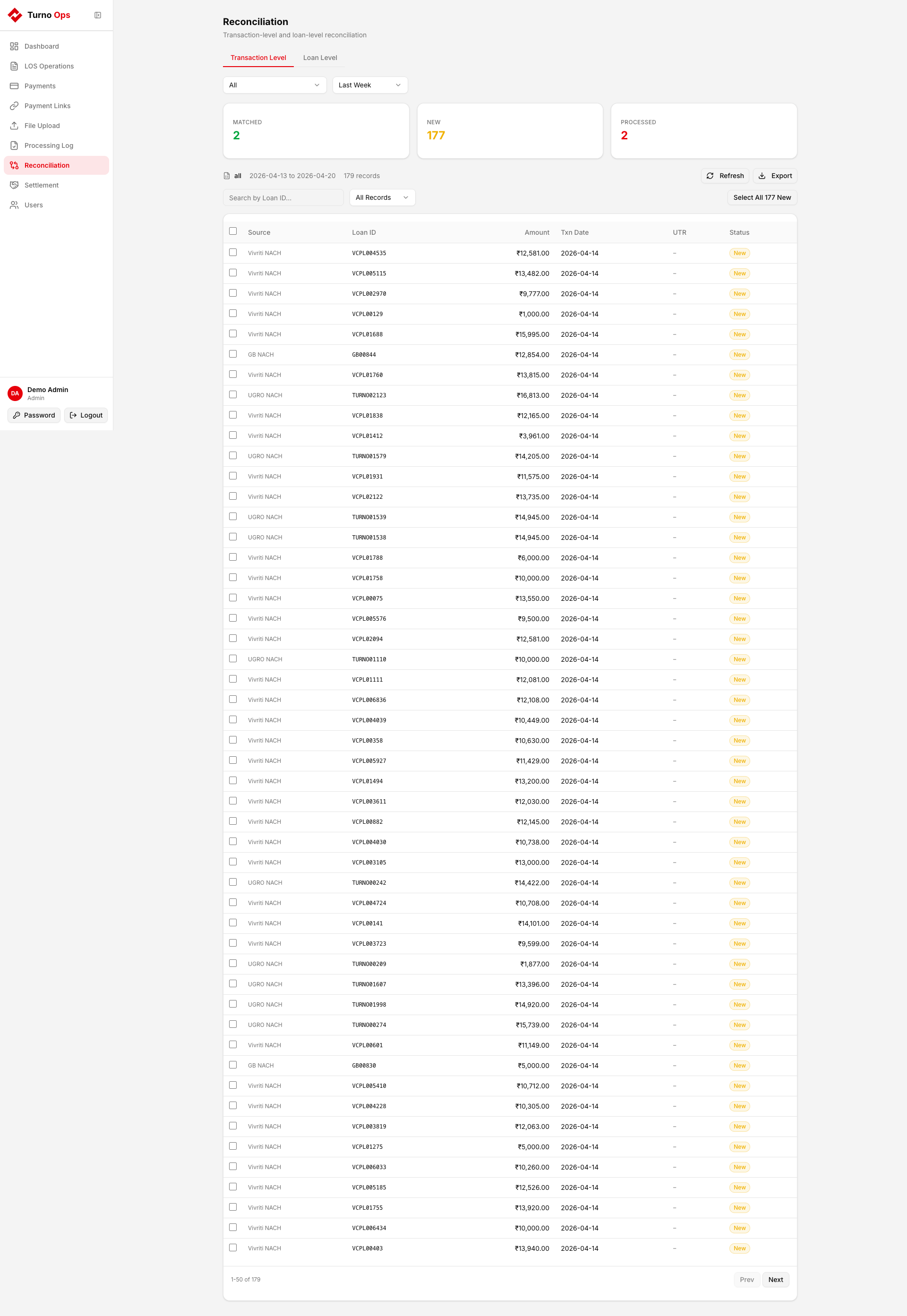
Using the Recon Tab
1. Select Filters
- NACH File - choose a lender (GB, UGRO, Vivriti) or "All"
- Date Range - Last Day, Last Week, or Custom range
2. Review Records
The table shows all recon records with:
- Loan ID - Fineract external loan ID
- Amount - transaction amount
- Txn Date - transaction date
- UTR - payment reference (if available)
- Status - Matched or New
3. Search
Use the search box to find specific loans by ID.
4. Select Records
- Checkboxes on each "New" row for individual selection
- Select All checkbox in the header for current page
- Select All N New button to select all new records across all pages
5. Reconcile
Click Reconcile N Selected to post the selected records to Fineract as repayments. A confirmation dialog shows the records that will be posted.
The reconciliation pipeline:
- Fetches the selected records from
CORE_TRANSACTION_DATA - Posts each as a repayment to Fineract
- Records results in
CORE_TRANSACTION_DATA_PROCESSED - Matched records won't appear as "New" on the next refresh
6. Refresh & Export
- Refresh - re-runs dbt to update the recon data
- Export - downloads the current recon results as CSV
Data Flow
Automated vs Manual
| Path | Triggered By | Lenders | Description |
|---|---|---|---|
| 30-min scheduled job | Prefect cron | Arthmate, DMI, IKF, Shivalik | Auto-posts all unprocessed records (recon_source IS NULL) |
| Recon UI (manual) | Operator | GB, UGRO, Vivriti | Operator selects and posts specific records (recon_source IS NOT NULL) |
The 30-minute job explicitly excludes recon-enabled lenders (GB, UGRO, Vivriti) so they don't get double-posted.
API Endpoints
| Method | Path | Description |
|---|---|---|
GET | /api/reconciliation/summary | Fetch recon summary + records |
POST | /api/reconciliation/post-to-fineract | Post selected records to Fineract |
POST | /api/reconciliation/refresh | Trigger dbt refresh |
GET | /api/reconciliation/{id}/export | Download recon report as CSV |